
Secure Ultra-sensitive Documents with Enhanced Sharing Controls
With robust features such as granular permissions, two-factor authentication, password-protected links and sensitive file scans, Egnyte’s platform makes it easy for companies to securely share and manage data, across their user base, for a multitude of of use cases.
However, there are situations that require a higher level of data governance, control, and confidentiality. These could include managing confidential documents for mergers and acquisitions, funding rounds, high-level partnerships, legal actions, and large financial transactions.
To secure the critical content used in these scenarios, companies would traditionally have spun up entirely separate, standalone file infrastructures. Or they would have sought out purpose-built virtual data room software, which could add significant cost and complexity for firms with limited budgets.
Egnyte provides a simpler, smarter alternative. With the latest updates to the platform, Egnyte provides a toolkit to restrict highly confidential data only to the intended user groups, such as executives, auditors, attorneys, or financial professionals, along with built-in controls to prevent illicit sharing (whether done intentionally or accidentally).
These capabilities include:
- Preview-only folder links
- Watermarking
If you’d like to learn more about the capabilities, contact your Egnyte rep or use the chatbot below to set up a meeting. You can learn more about each of the updates below.
Preview-only Folder Links
Let’s say your recipients need to preview a large number of files for a complex deal. Rather than sending multiple links (one for each file), you can now share a link to a single folder that contains all the preview-only files. This makes it easier to share a large number of files with an outside partner, while ensuring the integrity of each of the files, the same way you do for individual files.
First, select a folder and click on share.
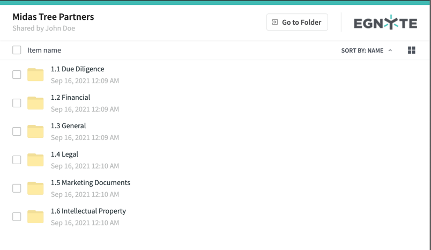
Now the option to share a preview-only link appears for folders just as it does for individual files.
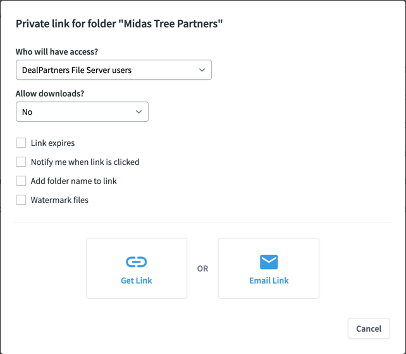
When a private link to a folder is selected and the sender does not allow downloads, it creates a preview-only folder link. The preview-only folder link saves time for the sender and receiver.
The folder preview link can be revoked by the sender—either at a pre-scheduled time or whenever changes in business requirements dictate. This effectively removes access to all the files with a single click. The “Notify me” option allows the sender to determine that the workflow is progressing. They will receive a notification as soon as the recipient opens the folder.
You can learn more about Preview-Only Folder Links here.
Watermarking
In situations where recipients are discouraged from forwarding critical information, the sender can watermark files that are shared via links. This feature imprints an indelible “mark” across the page to indicate that the document is confidential and should not be shared.
Normally, the watermark appears on the screen in preview-only mode, but if you allow downloads, the file itself (.pdf, .doc) can also be watermarked. As an additional deterrent, you can use dynamic watermarking, in which the viewer’s IP address is included in the watermark text. Thus, if a document is leaked in a multi-party deal, for example, it can be traced back to the party who leaked it.
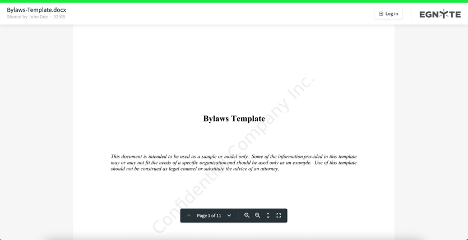
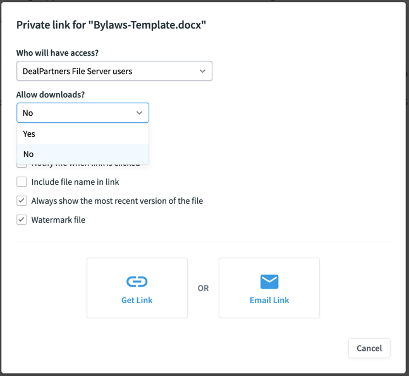
You can choose to watermark a file by simply checking the box when preparing to share it.
Find out more about Watermarking in this Helpdesk article.
Get Started Today
Using these tools, Egnyte customers can assemble a “virtual situation room” for large deals, M&A, funding rounds, and critical business events that require additional controls. Combine the intuitive collaboration tools of the Egnyte platform with secure file sharing for highly sensitive files by signing up for a free trial now.